Python SDK reference
Use the SDK for the training session APIs (sagemaker.train.training_session) to drive a
training loop from your own Python process. Your code issues each step
— a forward and backward pass, an optimizer step, sampling, saving or loading a
checkpoint — and SageMaker AI manages the infrastructure and the base model. This page
describes the behavior you need to write a correct loop.
pip install sagemaker-train
At a glance
from sagemaker.train.training_session import ServiceClient, AdamParams
from sagemaker.train.training_session._utils import _serialize_loss_fn_inputs

PAIRS = [
    ("Question: 2+2?\nAnswer:", " 4"),
    ("Capital of France?", " Paris"),
]

svc = ServiceClient(
    region="us-west-2",
    role_arn="arn:aws:iam::111122223333:role/MyRole",
    model_package_group_arn="arn:aws:sagemaker:us-west-2:111122223333:model-package-group/my-training-session-checkpoints",
    s3_output_path="s3://amzn-s3-demo-bucket/training-sessions/",
)
print(svc.list_base_models())              # base models you can fine-tune in this Region
tc = svc.create_lora_training_client(base_model="<name from list_base_models()>", rank=32, alpha=64)
tok = tc.get_tokenizer()                   # the service takes token IDs, so tokenize client-side

batch = []
for prompt, response in PAIRS:
    prompt_ids = tok.encode(prompt, add_special_tokens=False)
    ids = tok.encode(prompt + response, add_special_tokens=False)
    prompt_len = len(prompt_ids)
    eos = tok.eos_token_id if tok.eos_token_id is not None else ids[-1]
    target_tokens = ids[1:] + [eos]
    weights = [0.0] * prompt_len + [1.0] * (len(ids) - prompt_len)
    batch.append({
        "modelInput": {"chunks": [{"tokens": ids, "type": "encoded_text"}]},
        "lossFnInputs": _serialize_loss_fn_inputs(
            {"target_tokens": target_tokens, "weights": weights}
        ),
    })

# Both calls return an APIFuture immediately, so optim_step is queued behind
# forward_backward. Resolve both once they are submitted.
fwd_bwd = tc.forward_backward(batch, loss_fn="cross_entropy")
step = tc.optim_step(AdamParams(learning_rate=5e-5))
print(fwd_bwd.result().metrics, step.result().metrics)

print(tc.save_state().result().model_package_arn)
tc.stop()
Each datum in a batch carries the loss inputs its loss function
requires — see Training data.
get_tokenizer() requires the tokenizer extra
(pip install 'sagemaker-train[tokenizer]'); pass token IDs directly to
skip it. Available base models vary by Region. Call list_base_models()
instead of hard-coding a list.
Clients
| Client | Use it to | Get one from |
|---|---|---|
ServiceClient |
Create sessions. List sessions, base models, and checkpoints. | Construct it directly. |
TrainingClient |
Drive the training loop. | ServiceClient.create_lora_training_client or either
restore factory. |
SamplingClient |
Generate tokens from one fixed set of weights. | A TrainingClient, or a ServiceClient when
no session is running. |
The following diagram shows which factory method creates each client:
A
ServiceClientcreates aTrainingClientthroughcreate_lora_training_client,create_training_client_from_state, orcreate_training_client_from_state_with_optimizer.A
ServiceClientcreates aSamplingClientdirectly throughcreate_sampling_client.A
TrainingClientcreates aSamplingClientthroughcreate_sampling_clientorsave_weights_and_get_sampling_client.

ServiceClient requires role_arn, the IAM role each
session assumes. Set model_package_group_arn, s3_output_path,
kms_key_arn, and vpc_config on the client to apply them to
every session it creates, or pass them per call to override. When you omit them, SageMaker AI
supplies account defaults.
Each factory has an *_async twin that takes the same arguments and
returns the same client. Creating a session waits for it to become ready, which takes
from seconds to several minutes depending on the model. The _async form
performs that wait without blocking the event loop.
tc = await svc.create_lora_training_client_async(base_model="...", rank=32)
Operations and results
Every operation submits when you call it and returns an APIFuture.
future.result() blocks until the operation finishes, then returns the
result or raises OperationError. It accepts timeout and
poll_interval. await future does the same inside an event
loop without blocking it.
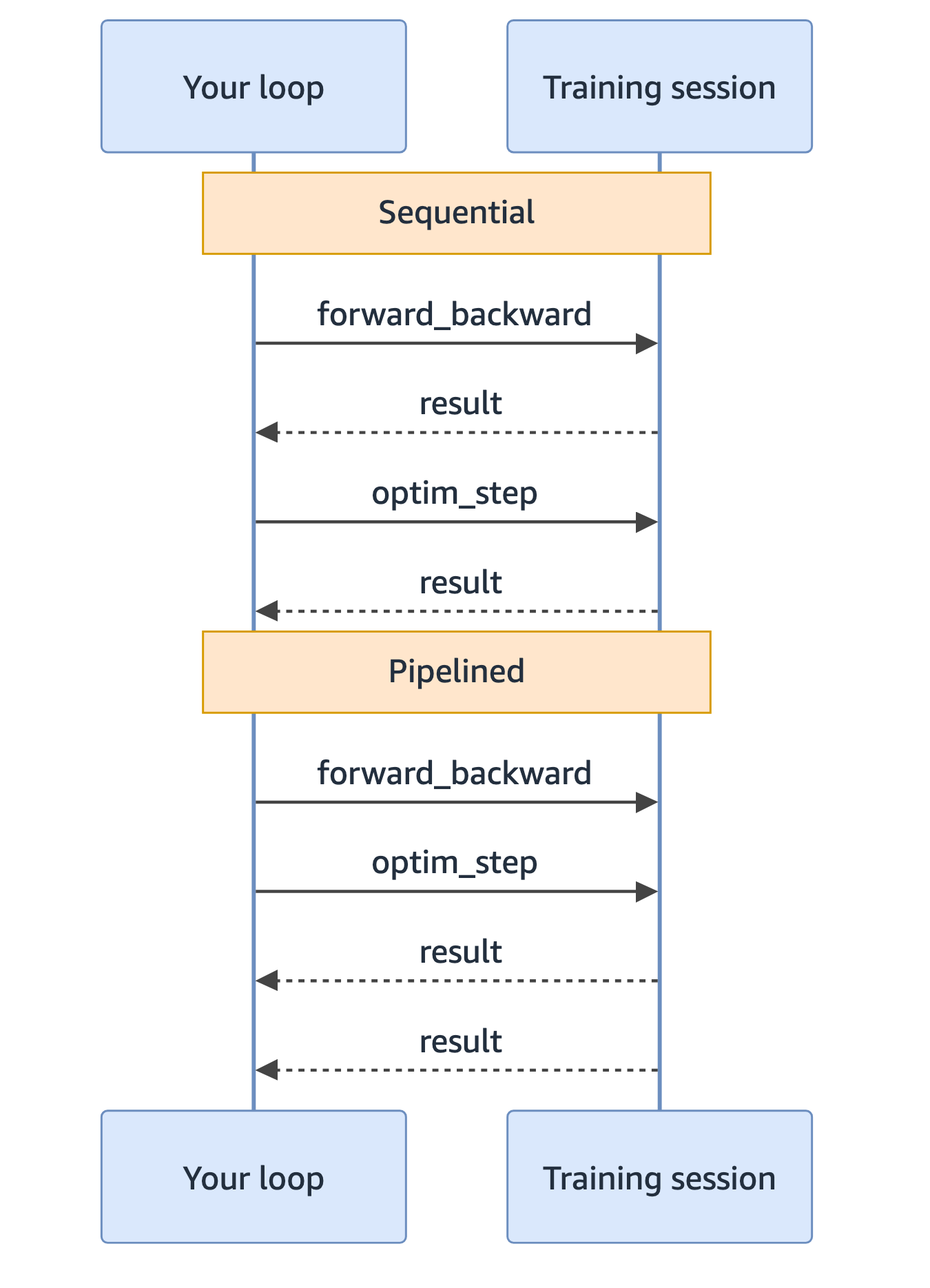
Submit successive operations before collecting the earlier one. They pipeline, and both run in the same cycle.
The following diagram compares two ways to run forward_backward and
optim_step:
Sequential: you collect each result before you submit the next operation. Each operation costs one full round trip.
Pipelined: you submit both operations, then collect both results. Both operations are in flight in the same cycle.
The following loop uses the pipelined pattern.
for batch in data_loader:
    fwd_bwd = tc.forward_backward(batch, loss_fn="ppo")
    optim = tc.optim_step()
    fwd_bwd.result()
    optim.result()
Async variants
What an *_async method returns depends on whether the operation is
ordered.
| Operations | *_async returns |
|---|---|
forward_backward, forward,
optim_step, save_state,
save_weights_for_sampler, load_state,
load_state_with_optimizer |
An APIFuture. Await it again for the result. |
sample, compute_logprobs |
The result: SampleResponse or
list[float | None]. |
Training operations run in the order you submit them, so the coroutine returns a future and you choose when to wait. Sampling operations are independent, so the coroutine returns the result directly.
# Training: two awaits
fwd_bwd = await tc.forward_backward_async(batch, loss_fn="ppo")
result = await fwd_bwd

# Sampling: one await
response = await sc.sample_async(prompt, num_samples=4, sampling_params=params)
Concurrent sampling
Each sample call takes one prompt.
SamplingParams.max_tokens defaults to 512, which is also the smallest
value the service accepts. Sampling operations are independent, so keep many in
flight to raise throughput.
results = await asyncio.gather(*(
    sc.sample_async(p, num_samples=4, sampling_params=params)
    for p in prompts
))
Synchronous code achieves the same by submitting every call before collecting any:
ops = [sc.sample(p, num_samples=4, sampling_params=params) for p in prompts]
results = [op.result() for op in ops]
Model source
create_training_client_from_state,
create_training_client_from_state_with_optimizer, and
create_sampling_client accept a base model, saved weights, or both.
| You pass | Result |
|---|---|
model_package_arn only |
The base model comes from the package, at the version the weights were trained on. |
base_model only |
Resolved to its latest version. |
| Both | They must name the same base model, or the call raises
ValueError. The version still comes from the
package. |
Because only the model name is compared, a base_model that resolves to
a newer version than the checkpoint is accepted, and the checkpoint version is used.
base_model accepts a name from list_base_models(), a
HuggingFace model ID, or a full hub content ARN to pin an exact
version.
Checkpoints
Both checkpoint calls register a versioned SageMaker AI model package. They differ in what they contain.
| Call | Contains | Use it to |
|---|---|---|
save_state() |
Weights and optimizer state | Resume training where it stopped. |
save_weights_for_sampler() |
Weights only | Sample from or deploy a snapshot. Pass
merge_weights=True to also write a self-contained merged
model to the same package version. |
The following diagram shows the two save paths and how you use what each one
produces. save_state writes a ModelPackageKind.CHECKPOINT
package that contains the weights and the optimizer state. Restore it with
load_state_with_optimizer to resume exactly where training stopped, or
with load_state to resume training with a new optimizer.
save_weights_for_sampler writes a ModelPackageKind.MODEL
package that contains the weights only. You can sample from it or deploy it.
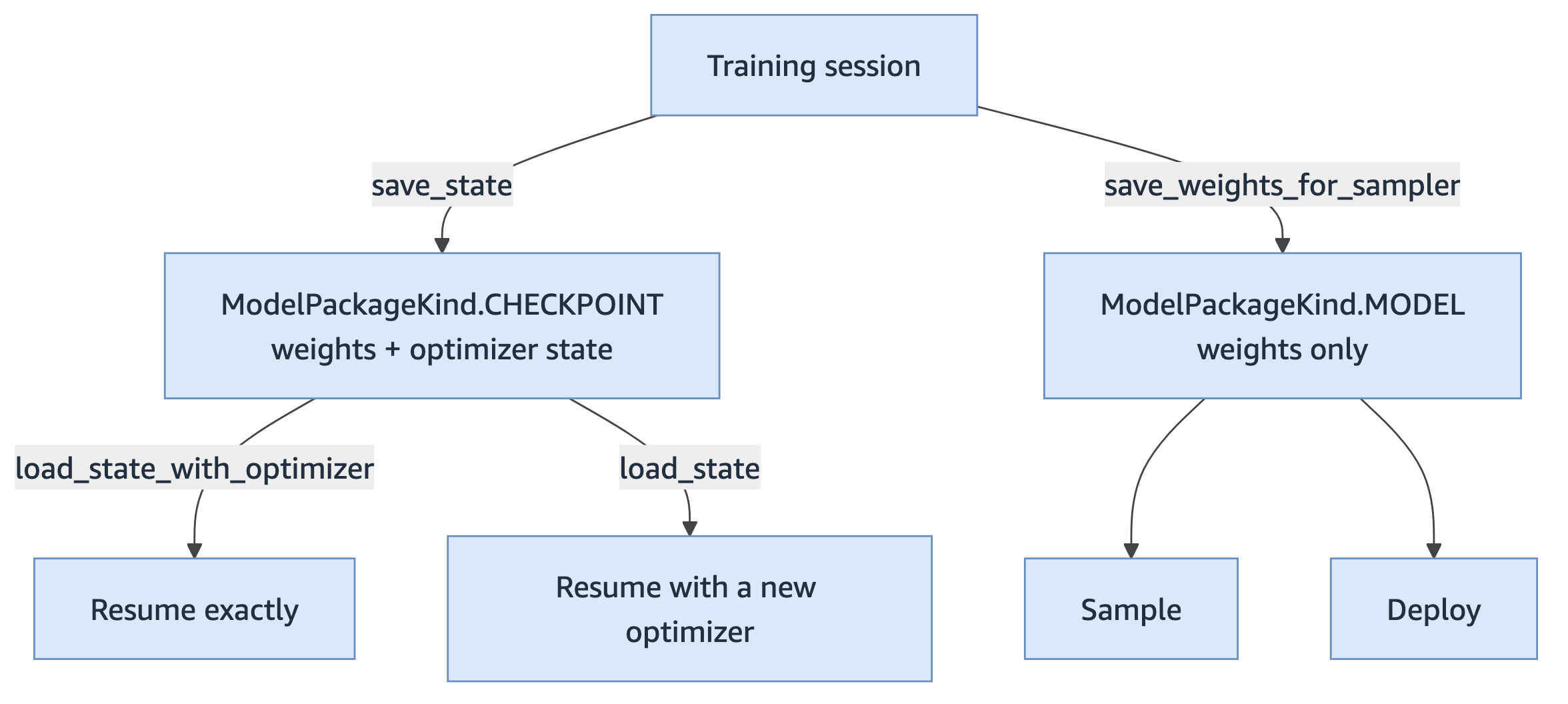
The diagram shows the following paths:
save_statewrites aModelPackageKind.CHECKPOINTpackage that contains the weights and the optimizer state.save_weights_for_samplerwrites aModelPackageKind.MODELpackage that contains the weights only. You can sample from it or deploy it.load_state_with_optimizerrestores a checkpoint package with its optimizer state, so training resumes exactly where it stopped.load_staterestores the weights from a checkpoint package and resets the optimizer.
Restore with the method that names what you want:
tc.load_state(arn).result()                 # weights only; optimizer resets
tc.load_state_with_optimizer(arn).result()  # weights and optimizer
Resume a run
A session is compute and cannot be reattached by name. The checkpoint is durable on its own, so checkpoint periodically and resume by starting a new session from the latest one.
if step % checkpoint_every == 0:
    tc.save_state(description=f"step {step}").result()

# Later, or in a new process
svc = ServiceClient(region="us-west-2", role_arn=role_arn, model_package_group_arn=my_group)
ckpt = svc.get_latest_model_package(ModelPackageKind.CHECKPOINT)
tc = svc.create_training_client_from_state_with_optimizer(model_package_arn=ckpt.model_package_arn)
Pass your own model_package_group_arn for runs you intend to resume.
get_latest_model_package searches the group set on the client or
passed per call, and raises ValueError when neither is set. One group
per experiment also keeps the result exact, because an unnamed group is shared
across your account.
Each saved package consumes Amazon S3 storage until you remove it.
delete_model_package(arn) removes the package; add
delete_artifacts=True to remove the stored weights as well. The
package holds the only reference to its Amazon S3 location, so deleting the package
alone leaves the objects in place.
Training data
forward_backward accepts token ID lists or strings. For control over
the loss, pass Datum objects.
from sagemaker.train.training_session import Datum, ModelInput, TensorData, TensorDtype

Datum(
    model_input=ModelInput.from_ints([101, 2023, 3456]),
    loss_fn_inputs={
        "target_tokens": TensorData([2023, 3456, 0], dtype=TensorDtype.INT64, shape=[3]),
        "weights": TensorData([0.0, 1.0, 1.0], shape=[3]),
        "logprobs": TensorData(logprobs_tensor),   # torch or numpy
        "advantages": TensorData([0.0, 1.5, 1.5], shape=[3]),
    },
)
Each loss function requires specific loss_fn_inputs keys. Omitting one
fails the operation.
loss_fn |
Required keys |
|---|---|
cross_entropy |
target_tokens, weights |
ppo, importance_sampling,
cispo |
target_tokens, weights,
logprobs, advantages |
Two requirements apply to every value: the length matches the model input (provide a
full-sequence value with the prompt positions zero-padded; a length that disagrees with
the token count is rejected), and weights masks the prompt (use
0 for prompt tokens and 1 for response tokens so the loss
counts only the response).
TensorData accepts torch tensors and
numpy arrays and converts them when the operation is sent. To pass
strings rather than token IDs, call get_tokenizer() on a
TrainingClient or SamplingClient. This loads the base model
HuggingFace tokenizer and requires the tokenizer extra:
pip install 'sagemaker-train[tokenizer]'.
On-policy sampling
A SamplingClient is bound to the weights that existed when you created
it. A later save_weights_for_sampler does not change what it samples, and
reusing it raises no error — rewards simply stop improving. Rebind after every
update:
sc = tc.create_sampling_client()
for step in range(num_steps):
    ops = [sc.sample(p, num_samples=4, sampling_params=params) for p in prompts]
    rollouts = [op.result() for op in ops]
    tc.forward_backward(build_batch(rollouts), loss_fn="ppo").result()
    tc.optim_step(AdamParams(learning_rate=1e-5)).result()
    sc = tc.save_weights_and_get_sampling_client()
Sessions
| Call | Effect |
|---|---|
tc.stop() |
Stop the session. The session record is retained. |
tc.delete(stop_if_active=False) |
Delete the session. Pass stop_if_active=True to stop it
first. |
svc.stop_session(name),
svc.delete_session(name) |
The same, addressed by name. |
svc.list_sessions(status_equals=...) |
List sessions, paginating automatically. |
A session supports one TrainingClient at a time. A second client on the
same session raises ConcurrentAccessError. Call stop() when
you finish, or scope the client to a with block.